
Changes
Replay the race on Watch online
Section titled “Replay the race on Watch online”“Watch online” now has a time bar under the map. Drag the slider back to any moment and every track is drawn only up to that time, with each runner’s dot where they were right then; drag it to the far right to return to Live. The badge at the map’s top right shows “Time: 12:31:05” or “Time: Live”. Press ▶ Play to replay the race automatically at 10×, 30×, 60× or 120× (60× is one minute of the race per second). It works after the event too, which makes it ideal for post-race analysis and debriefs: who took which route choice, where time was lost, and how runners compared at the same moment.
Categories in one event
Section titled “Categories in one event”An event can now run several categories side by side — say “Long”, “Short” and “Juniors” — each with its own name, description and course (categories can also share a course). Add them with “Add category” when creating or editing an event, or from “Categories” in the event’s “⋯” menu. Runners choose their category when they enter, and organizers can move an entry until that runner starts. Each category is ranked on its own, and messages can go to one category only. Under “Advanced settings”, a category can set its own spots limit (with its own waitlist), start window, team or individual entry, and Score-O time limit. An event with a single category looks just as before.
Statistics and split comparison
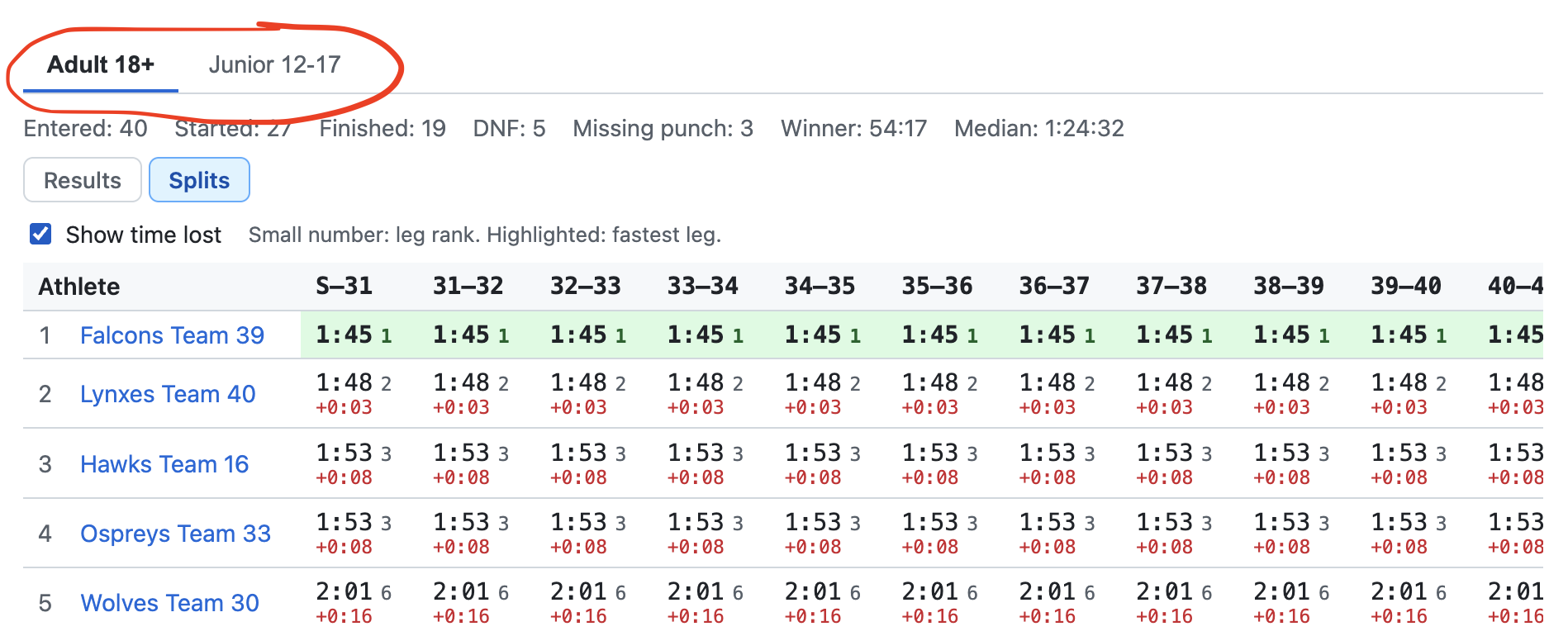
Section titled “Statistics and split comparison”Every category’s results now open with a summary — entered, started, finished, did not finish — and a Splits view that compares each leg across runners: fastest leg highlighted, each runner’s leg rank, and “Show time lost” against the best. Score-O shows who reached each control and when. “Watch online” gains a category filter that shows that category’s runners on its own course.
Punch by QR code
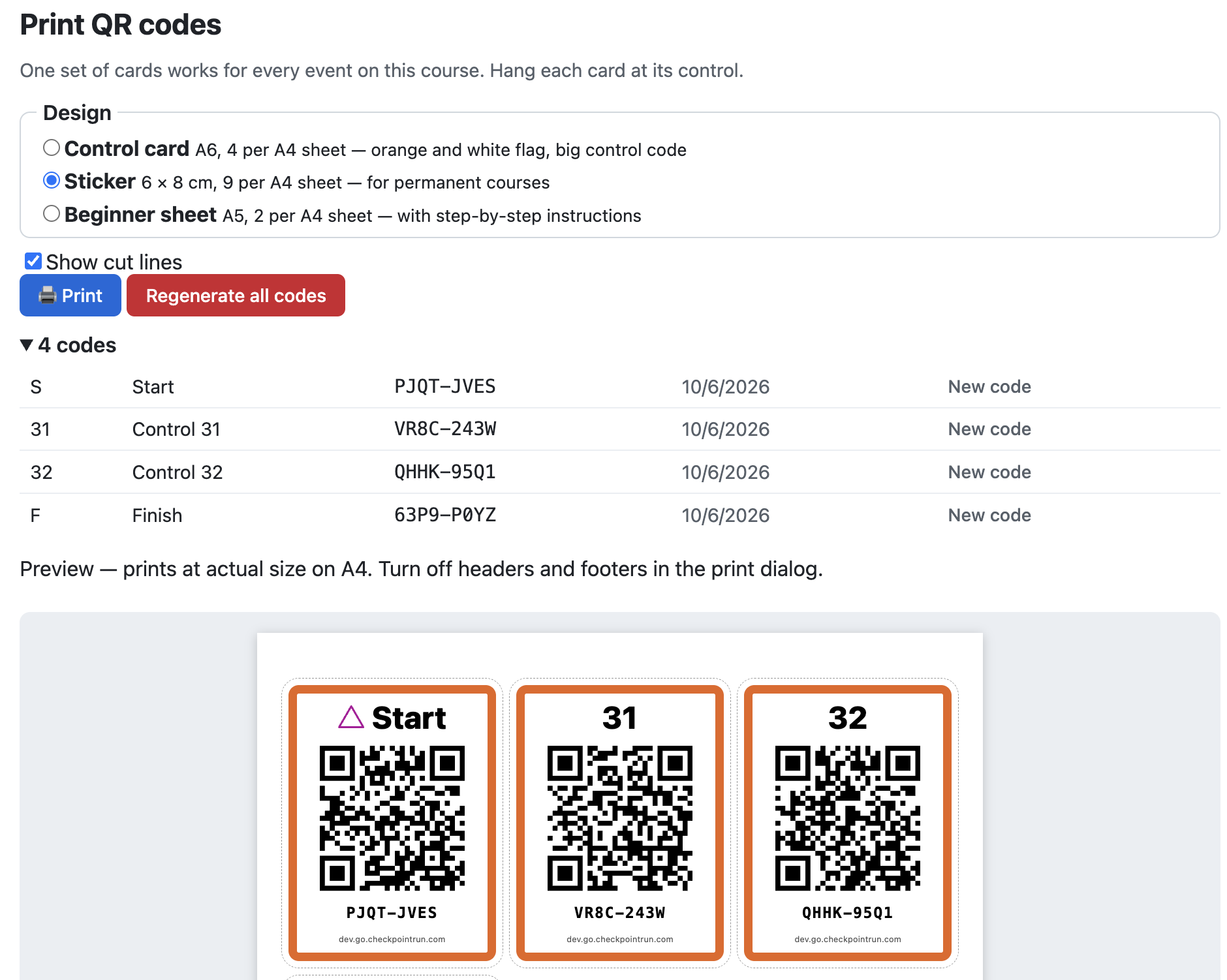
Section titled “Punch by QR code”Every control on a course now has its own QR code, as an alternative — or an addition — to GPS punching. Print them from the course’s “⋯” menu as control-flag cards, weatherproof stickers for permanent courses, or beginner sheets with step-by-step instructions, and hang one at each control. Runners scan with the Run screen’s “Scan QR” button, or simply with their phone’s camera, and it works with no signal too. Each event chooses how it’s punched: GPS only, QR only, GPS or QR, or both together for competitions. One set of cards serves every event on the course, and “Regenerate all codes” retires old prints if a code gets around.
Ready-made orienteering maps for Finland and Spain
Section titled “Ready-made orienteering maps for Finland and Spain”“Import from a service” now also offers MapAnt Finland and Mapant España: orienteering maps generated automatically from national laser-scan data, covering the whole of Finland (Åland included) and the whole of Spain (the mainland, the Balearics and the Canaries). Unlike aerial imagery, they already show contours, vegetation, rock, marsh and paths in orienteering symbols, so almost any forest in either country becomes a usable training map in a click. They’re computer-generated rather than surveyed on foot, so a club’s own competition map is still more accurate. Both are free under CC BY 4.0 and credited on the map; a large area fills in with full detail over a few minutes.
Community imagery from anywhere in the world
Section titled “Community imagery from anywhere in the world”“Import from a service” now also offers OpenAerialMap, a worldwide collection of drone and aerial imagery shared by volunteers and humanitarian mapping projects — often sharper than a few centimetres per pixel. Coverage is patchy, concentrated wherever someone has flown a survey, so the button now checks in the background and tells you before you click: “Import from a service” when a service has imagery for the area shown, “No service found” when none does. Only imagery whose licence allows use in Checkpoint is offered.
Import a georeferenced map from an aerial-imagery service
Section titled “Import a georeferenced map from an aerial-imagery service”When creating or editing a map, Checkpoint can now fetch and align real aerial imagery straight from an open-data provider instead of you finding, cropping and georeferencing your own image — covering Ontario and France so far, with more providers to come. Imported maps render at full native resolution as you pan and zoom, and “Save area offline” still saves the whole thing for race day with no connection.
A compass on the map
Section titled “A compass on the map”Any course can now offer a live compass alongside its control-description legend: drag it into place, pinch or scroll to size it up to double, and it rotates with your device’s own heading — the same classic card a handheld compass uses, not a spinning needle. A small toggle in the map’s corner shows or hides it without touching the course’s own setting.
Resize and quick-collapse for the legend
Section titled “Resize and quick-collapse for the legend”The control-description legend can now be shrunk down to half its size — pinch or scroll it, same as the compass — and that size is saved per course, the same way its position already is. Double-tapping it anywhere collapses or expands it, not just its small flag button.
Pictorial control descriptions
Section titled “Pictorial control descriptions”Give any control the standard IOF description — the feature it’s on, how it looks, its size, where the flag sits relative to it — the same picture-based columns printed on real event maps. They show up as a compact row of symbols wherever that control appears, and a full legend table can be pinned over the map itself: drag it anywhere, or collapse it down to a small flag when it’s in the way. Courses using it can also be exported (and re-imported) as IOF XML v2, the format that actually carries this data, for use in Purple Pen, OCAD or Condes.
Show a course on its map
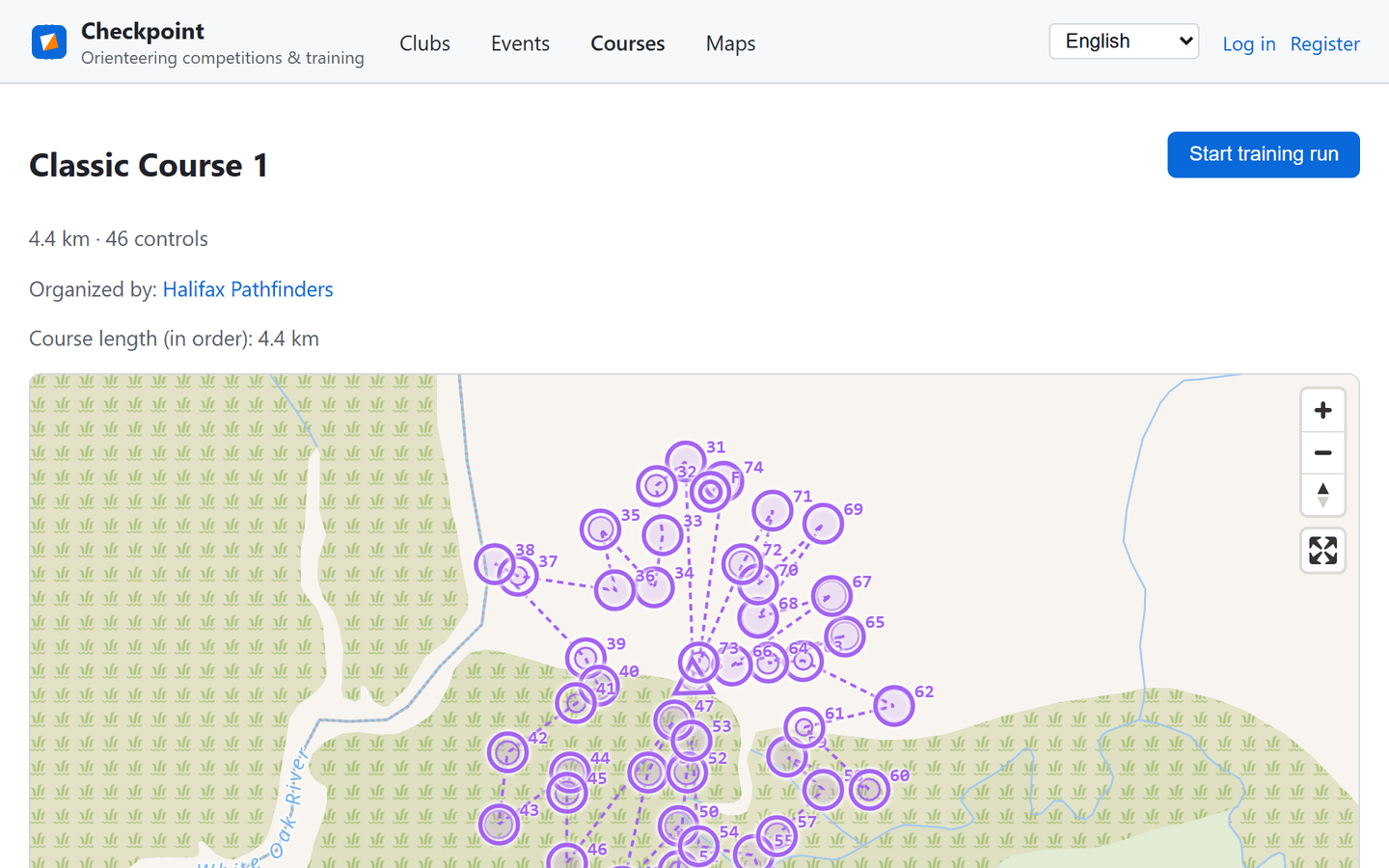
Section titled “Show a course on its map”A map’s own page now lets you pick from the courses drawn on it — public ones, plus any belonging to a club you’re in — to see that course’s controls and line laid over the map. Quick links tie the two pages together: jump from a map to a course, or back again.
Import and export courses
Section titled “Import and export courses”A course can now move between Checkpoint and the rest of the orienteering world. Import a course drawn in Purple Pen or OCAD (IOF XML), or one made for MapRun (KML) — one button, and the file format is recognised automatically. Every course you can view can also be exported the other way, to open in those same tools or to run on MapRun. One MapRun note: the punch radius isn’t part of a KML file, so set the event tolerance when you upload there.
A tidier course page
Section titled “A tidier course page”The course page’s row of buttons had grown crowded, especially on a phone. The everyday actions — start a training run, share, edit, create an event — stay up front, while the occasional ones (export, duplicate, delete) now sit behind a small ⋯ menu. The header also lays itself out properly on small screens.
Watch an event live on the map
Section titled “Watch an event live on the map”A new “Live data” view, open once an event is Live or later, plots every entrant’s recorded GPS track on the course map — each athlete or team in their own colour, with a checkbox to show just the ones you care about, or filter to only the Finished or Unfinished. Tap the dot at the end of a track to jump to that person’s result. On a Score-O course it also shows each runner’s live score and, when the course has a time limit, their own countdown to it.
Follow a feedback thread
Section titled “Follow a feedback thread”Post an idea on the feedback board, or comment on someone else’s, and you’ll get email when that thread gains a comment or changes status — including “your idea is now Planned”. A Follow button lets you watch an idea you haven’t posted on, and every email carries a one-click unsubscribe.
Message everyone entered
Section titled “Message everyone entered”Organizers can write to an event’s registrants in one go — the approved entries, the ones still awaiting approval, or all of them — and choose between a message people can reply to and an announcement sent under the event’s own name.
Messages and one notification bell
Section titled “Messages and one notification bell”Members can message each other in threads, and a single bell in the header counts everything waiting on you: unread messages, club invitations, friend requests, and decisions on your entries.
Share an event, a course, or your result
Section titled “Share an event, a course, or your result”Every event, course, club, and map has a short link that previews as a card in chat and a QR code you can print. Your own result can have a public page too — only if you publish it, and you can take it down again at any time.
Feedback in your own language
Section titled “Feedback in your own language”Ideas and comments on the feedback board are translated automatically into all six languages Checkpoint speaks — write in yours, read in yours, with the original a click away.
Entry limits and waitlists
Section titled “Entry limits and waitlists”Cap an event by how many people it can take. Once it’s full, entries join a waitlist and move up automatically, in order, as places free up.
Control over who sees your results
Section titled “Control over who sees your results”Each event decides who can open an athlete’s splits, track, and map — everyone, its registrants, or only its organizers.